
- Let’s find answers to your questions 🙂
Got a problem with SWIFT?
Follow these instructions, 70% of the time following these instructions should solve your problem.
- Make sure you have the latest copy of the theme. You can download the latest version here.
- Reinstall Swift.
- Check if you have selected appropriate options in the options page.
- If you have added any code to the theme files or widgets, make sure all the html tags are closed.
- Sometimes a faulty outdated plugin may clash with SWIFT. Deactivate all the plugins and see if it solves the problem.
- Deactivate widgets to see if they are creating any problem.
If these doesn’t solve your problem, try again after some time, you might have missed something. If this still doesn’t solve your problem head to the support forum, I’m waiting there to solve your problem.
Frequently Asked Questions
1. Thumbnails not showing up
Swift uses WordPress post thumbnail feature for thumbnails. You should set featured image for thumbnails to show up. If you are switching to Swift from a theme which doesn’t use thumbnails or uses custom fields for thumbnails, you have to update each post and set the thumbnail. That can be cumbersome task if you are having lot of posts. Luckily there is a plugin which can automatically set the post thumbnails. Here are the step by step instructions.
- Install Auto Post Thumbnail plugin
- Then goto settings -> auto post thumbnail and generate thumbnails.
TIP: You can set the thumbnails manually for your future posts, or leave the plugin activated to have them set automatically.
2. Thumbnails not cropping/resizing correctly
Swift uses built in WordPress functions to generate post thumbnails, which in turn depends in the meta data created while you upload the image. If for some reason WordPress couldn’t process the image when its uploaded, then meta data won’t be created. So the thumbnails won’t be cropped correctly. To fix this..
- If its only one or two posts, you can delete the thumbnail and reuplaod it. If that does not solve the problem, use a different image.
- If there are many images..
- install Ajax Rebuild thumbnail plugin.
- Goto tools->rebuild thumbnails
- Check thumbnail and ” ” and rebuild thumbnails.
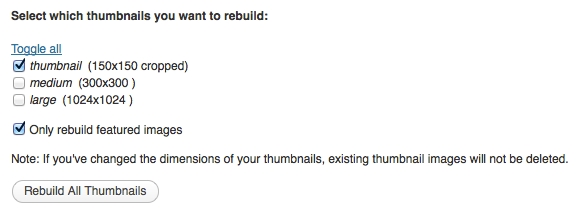
- Rebuilding thumbnails
3. Feed count not shown?
Enable “Show feed count” option in your feedburner account settings.
I have followed the instructions above on the thumbnail images yet they still do not generate for the posts. Also, when on an ipad, the right sidebar does not appear correctly and actually falls off the page. If you have any suggestions, please let me know!
Dear Satish, my feedburner digine not shown proper. in feedburner (subscribe) not shown proper it look like succrib…. e so please help me
I hate posting a question regarding an old release… but here it is.
Our server guys at UMKC have installed a version of the Swift theme – 4.1.1 into a multi-user environment. I really, really like the depth of features and am anticipating a nice presentation of info with the tool.
The problem that I’ve noticed is that the landing page/main page of the blog isn’t displaying/referencing the images. The “handles” are there but are unable to be displayed. For example, in Safari, the blue box with a question mark appears with the post information. In the actual post/story, the image is present.
Do you have any advice on trouble shooting this issue? Is this display issue related to the multi-user installation or another server related problem?
Once again, apologies for this request. It is being made as WordPress is currently not “officially” supported and I must seek answers to these problems.
Thank you.
Best Regards – Dave
Is swift/cache folder writable?
It’s not the problem with multi-user installation, upgrade to the latest version as you haven’t done any customizations.
If you need any help with installation, I’m available for hire.
I need help for my website! I used your theme, and love it! However, I am having a problem because no one can leave a comment. This comment form is up on the page, but when the user clicks submit comment, they are brought to a white screen, and their comment does not go through. the white page that they are brought to is “mywebsite.com/wp-comments-post.php”
What should I do? Any idea what is wrong here?
Hello there!
I have a few questions/issues:
1. The Twitter and Delicious Share buttons are not working properly for me. They send me to “overload” or “error” pages.
2. I have not been able to figure out how to resize the font for post titles. Will you please help?
3. Is there a way to remove the “Home” link from the Categories nav menu?
Thanks for everything! I really dig this theme!
SWIFT re sizes the images that are wider than 560px to 560px, so that they wont flow out and break the layout.
Very good customization of SWIFT, keep up the good work.
But if I resize the images to a smaller size, it will be resized to the original size in the post. I’d like to keep them at the size I choose in editor. If I need to do it now, i’ll have to edit the image size before upload.
I’d like to upload the image in the original size and resize it with the editor. What configuration can I change?
I’m having the same issue…and my site is really based around posting images. I’d love a fix for this.
…and I am using the blog layout.
There seems to be a bug where it also resizes images that are smaller than 560×560. I’m displaying the thumbnailed version of a pic (i.e. pic-300×300.jpg) and I still cannot customize the size with standard markup.
I’m trying to use a static page as the front page. I don’t want the Recent Posts box on that front page. How can I remove that?
Thank you.
I don’t have the latest version… for some reason it wouldn’t work for me. The colors wouldn’t change or anything which is fine because I like the version I have. I do have a problem though. I am using a custom header and everytime I try to enter my feedburner id it puts an email form and subscribe button in the header and it messes it up so I’m forced to erase it. but I would like people to be able to subscribe… I still want to use my custom header though
Bug with custom colours is fixed in v4.0.1
http://swiftthemes.com/blog/wp-content/uploads/2009/11/swift-v4.0.1.zip
To remove the subscribe box in header
Find this code in header.php
<?php if($swift_feedburner_id){?>
<div class=”alignright” id=”subscribe”>
and replace it with
<?php if(0){?>
<div class=”alignright” id=”subscribe”>
Hello All,
Is it possible to to remove the sidebars on a certain page? For example, I want my “Privacy Policy” page not to have any sidebars. How do I go about implementing this?
Thanks,
Ghanima A.
I will add that option in future release.
Hi,
I have this warning on the page after select a tag. Would you please help me?
Warning: in_array() [function.in-array]: Wrong datatype for second argument in /home/thebestu/public_html/losguardianesdeluniverso.com/wp-content/themes/swift/index.php on line 16
I’m very happy using your theme, even i know i’m not ussing all its features because i’m a newbie on these.
Thanks in advance,
Pat.
PS:The last thing i made was paste the google analytics scrip in a text widget.
Find this code in index.php
<?php if (have_posts()) : while (have_posts()) : the_post();
if($swift_slider_disable !=”true”){if (in_array($post->ID, $do_not_duplicate)) continue;update_post_caches($posts);}
?>
and replace it with..
<?php if (have_posts()) : while (have_posts()) : the_post();
if($swift_slider_disable !=”true” &&$do_not_duplicate ){if (in_array($post->ID, $do_not_duplicate)) continue;update_post_caches($posts);}
?>