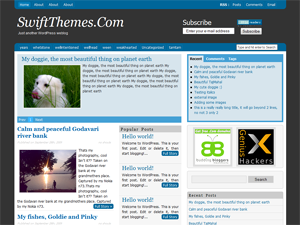
I’m very happy to announce the official stable release of SWIFT-v3.0.
Apart from the features announced in my previous post there are lot more improvements in v3.0.
Every element of theme is dealt with special care, to provide you with a free premium quality theme.
Here are a few improvements in v3.0
- SWIFT is now smart enough to check if there are any images used in the post and use it as thumbnail. It even detects images that are not stored on your server, this feature is unique to SWIFT and not found even in most premium themes.
- Redesigned the options page to make it easier to use.
- Care was taken to make sure you don’t hit the reset options button by mistake and loose all your settings.
- Changed the font style of the blog name.
- Special attention to margins and padding so that your blog doesn’t look crowded.
- Option to disable rounded corners in side bar.
- Changed the post title styling.
- All the html elements are styled to match the theme.
You can download the lastest version from the official theme directory
Download SWIFT v3.0
I feel that there is lot of scope in improving the front end of SWIFT, if you have any suggestion to improve the design please drop in.
Did swift save you the cost of a premium theme?? How about a donation?
I need tutorials of swift themes can you provide me
Hello dear’s i want to user 2 side bar at a time i which layout i select please help me all layout selection and use side bars way
Ottimo, lavorare con Swift è divertentissimo 🙂
How can I place a banner ad on the right side of the logo? Can you help me?
Im adding that feature in v4.0
This theme is brilliant! It is simply the BEST free template out there! Keep up the good work and know that you’re doing a brilliant job, and what makes you different from anybody else is that you’re generous – Keep it free and you will always be the best.
Great work, thank you!
One thing, though: The thumbnail script should check for the size of the picture, and then not use it if it’s less than 20 * 20 pixels or something, because that small pics does not look good as a thumbnail, and is likely not meant to be used that way. Also: if there’s more than one pic in a post, I should be able to choose which one to use as thumbnail.
And here’s a bug, I think: If I enable popular posts on the homepage, the normal blogposts doesn’t go back to fill the whole main area of the front page after the list of popular posts.. I’m not really good at explaining this in english, but I hope you understand.
I’d really like to have the list of popular posts in the tabbed box in the sidebar, instead of recent posts.
BTW, I really like the new font for the title. What’s it called?
Oh, and three more things: There’s still no white space between list items/bullet points. And I’d like to be able to turn off nested comments. And I’d like an option to remove the search bar, since I prefer to use the search widget in the sidebar.
The new options page is top notch, btw. And I love the rest of the improvements too. Really, really good job!
Thats a very good idea,I try to implement it in future release.
In v3.1 (After 3.0.5) I added the option to specify thumbnail url using custom fields, for now that should take care of the small images issue.
I couldnt get this part..
“If I enable popular posts on the homepage, the normal blogposts doesn’t go back to fill the whole main area of the front page after the list of popular posts.. I’m not really good at explaining this in english, but I hope you understand.”
I will integrate some popular posts plugin in tabbed interface or write a post telling how to add custom tabs.
Nested comments can be turned for from your wordpress admin panel,
Settings–>Discussion and turn off threaded comments.
The latest version has enough space between bullets and text, which version of SWIFT are you using??
To remove the search box, removed the follwing code from header.php
<div>
<?php include (TEMPLATEPATH . ‘/searchform-nav.php’); ?>
</div>
Font used for blog and title is “georgia”
Nice and effective theme for SEO. Thanks for sharing.
SWIFT is now smart enough to check if there are any images used in the post and use it as thumbnail. It even detects images that are not stored on your server, this feature is unique to SWIFT and not found even in most premium themes.
Love you for that 🙂 and for other updates too. Keep it up bro.
Thanks 🙂
it’s the latest update
thanks