This guide was written for SWIFT-v2.07, most of the things here dont apply to the latest version. You can find the guide for the latest version here
Installing SWIFT is not different from installing any other WordPress theme. SWIFT looks great with the default options but spending a few minutes on the options page will give you a unique look to make your blog stand out from crowd. SWIFT is actually a infinite number of themes packed in to one 🙂 .
Here is an example of how you can make your SWIFT unique without any template edits
Installing SWIFT
- Download your copy of SWIFT theme, and unzip the file you have downloaded.
- Upload the entire folder on to your server wp-content/themes. The template files should thus be here now: /wp-content/themes/swift-vX.X.X/.
- You can also upload your zipped file via CPanel and extract it.
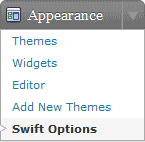
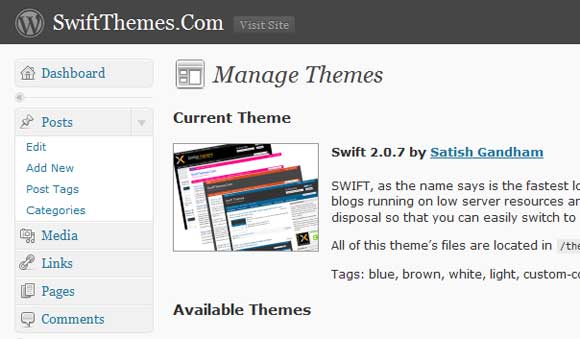
- Log into your WP admin panel and click on the Appearance tab –> themes. Now click on the SWIFT theme to activate it (see the first screenshot below).
- Change the permissions of swift/cache folder to 777 and swift/custom-styles.css to 666.
- Your blog is now powered by the fastest SEO friendly, cross browser compliant, Adsense optimized, server friendly theme.
Note:If you are using WordPress 2.7 or higher, you install the theme directly from the admin dashboard.
This theme is excellent. Thank you Satish.
Swift themes are only the themes i likes on wordpress paltform
Thanks
I am using Swift theme since last year, now i want to use this theme in 3 columns. Left Sidebar – Content – Right Help me to make my blog like this…
Maximum width supported by swift theme is 980 pixels but I want it to increase more.. Please suggest how to do it????
Hi, Just getting into Swift. Would like to add a font to match our product labelling. I have found the “enable custom fonts” checkbox and see how to select a font for the home page header but how to add a font – want Papyrus font for some things.
Thanks for any tips.
Steve
Hello,
We’re using your theme at tribalblogs.net and it’s great. I’ve been able to customize all of my colors except for the blue box that says Post a Comment and Submit Comment. Where is the coding? I know which html color code I want to use, I just can’t find the right place to change it.
Thank you!
I figured it out! I feel like the mouse who found the cheese and lived to tell about it. It was in the stylesheets.
this first time I use swiftthemes, I very like this theme, friendly look, and more great option and upgrade was make for this theme, thanks before.
Hello, Satish
please tell me how to properly configure the widget Swift 125 * 125 ads that it displays ads. what I do, go to the swift option in the management of banner ads in the box # 1 enter the URL where the jpg folder with the jpg, it is loaded on my site, then in the Enter destination url (link) here prescribe URL showing on partner sites image.jpg but it does not appear in Swift widget 125 * 125 ads. Tell me please what I’m doing wrong ….
Thanks.
I’m using this theme in my site http://www.modernwallclocksworld.com
i need help
I am currently using version 4.1.4 stable version and i wish to countinue like that but it dont have author bio for post pages. i would like to add author bio box with related post in it just like the one below this post(Black box) to my blog.
Can you help me out…..
waiting for your reply……..
change the permissions of swift/cache folder to 777 and swift/custom-styles.css to 666.
??? in /uploads/swift_custom ??? is it called “custom-styles.css” or “custom-style.css” ?? so not “swift/cache” BUT “/uploads/swift_custom/cache/” ??
This guide is for older versions,
cache folder and custom css are now located in
wp-content/uploads/swift_custom
wp-content/uploads/swift_custom/custom-styles.css
Hi Satish!
I’ve been using this theme since February but it is only now that I’ve really started tweaking with it (downloaded the latest version too), and I should say it is AWESOME!!! way, way better than the themes I tried and seen on other blogs.
Got a question. I know this has been asked somewhere here but I tried looking and couldn’t find any. Anyway, my question has something to do with the post titles on the homepage. How may I reduce their size?
I have setup feedburner on my blog. Now I need to install Chicklet Chooser. Google tells me to : Copy the HTML below for use in your own page templates:
I have the code. Now I need to know where to go to install it.
I would like to know how to proceed to “Change the permissions of swift/cache folder to 777 and swift/custom-styles.css to 666.” I am using 5.28
Thanks,
I have a problem on the 404 page, please take a look at mine:
http://funnypleaze.com/404.php
The listing popular posts are all “http://funnypleaze.com/.php”
How can I fix this?
Thank you
get the latest version
http://swiftthemes.com/download
when i install theme with wp-admin panel, swift themes automatic updates it 5.25 to 5.28, but i want to install latest version.
You have to install it manually, you can get the latest version here
http://swiftthemes.com/download/
I have chosen Swift theme because it is as easy to handle as it looks good. Yet, for the first time ever, my latest installation – http://herbs4all.com/blog – refuses to read my adsense codes… After triple checks… I am unable to find the answer. Anyone ever had the same problem ^ Anyone out there with an answer.
Regards
Paul Rodgers
Hi Satish,
Just to thank you for a a really wonderful WordPress theme. I am using swift theme at my website http://hostingpackagsare.com
I am wonder if i can get the Twitter and Facebook widget at my site, i am unable to find one at current version.
Thanks again, have a nice day….
I am using Swift v5.28. At the bottom of the “Ad management” page – Banner Destination – I have installed a banner in the Banner Destination section. Now, I would like to remove it but I do not know how to proceed…
Remove what you have pasted there and save changes.
For some reasons, what I have pasted is not accessible from where it was installed…
Hi,
I installed swift through wordpress and it seems that it’s missing option. Under the “layouts” tab i don’t have all of the available layouts that you show in your tutorials and I also don’t have the option of creating a child’s theme. Can you think of a reason for this?
get the latest version from here.
http://swiftthemes.com/download/
Can someone tell me how to change the header height to larger?
[I have a header pic that’s 960×253.]
Thanks,
mk.
Where are these Folders?
Change the permissions of swift/cache folder to 777 and swift/custom-styles.css to 666.
Just how are the permissions changed ^
I like this theme a lot. I’d like to use it for my online magazine. One thing that I’d like is to have the author or contributor name (as well a other optional text – e.g., date/time, location) appear under the title of each article. How do I do that? Thanks in advance
Satish-
I need help. I get this error when I activate the theme:
Warning: fopen(/home/mpkoontz/public_html/wichita-today.com/wp-content/themes/swift/includes/custom-style.css) [function.fopen]: failed to open stream: No such file or directory in /home/mpkoontz/public_html/wichita-today.com/wp-content/themes/swift/admin/admin-core.php on line 89
Warning: filesize() [function.filesize]: stat failed for /home/mpkoontz/public_html/wichita-today.com/wp-content/themes/swift/includes/custom-style.css in /home/mpkoontz/public_html/wichita-today.com/wp-content/themes/swift/admin/admin-core.php on line 90
Warning: fread(): supplied argument is not a valid stream resource in /home/mpkoontz/public_html/wichita-today.com/wp-content/themes/swift/admin/admin-core.php on line 90
And it just doesn’t look like your picture.
I did have version 5.14 working much better… But the new version is not working for me.
Have a look at my site: http://wichita-today.com
Is your wp-content/uploads/swift_custom folder writable??
Sorry, I just realized that i accidentally removed custom-styles.css file from the swift/includes folder, copy the custom-style.css from the earlier version to the new version and then activate the theme.
Hi there. I installed Swift and it’s working well so far. I installed directly from the admin panel. However, the options I selected when I first implemented it yesterday, such as which categories featured posts pull from on the homepage, can no longer be accessed. The only two links under Swift Options are for Options and Design Options. Neither show the layout options again, nor can I find how to add new categories to pull from. The ones I selected were a little light, so I don’t have the content populating as I’d hoped. Any ideas? I am not sure if I can do this manually now, but I am not seasoned with php.
Sorry if I’m wrong to answer, I though the Layout Options you can find inside “Design Options”, Category Featured Post at “Swift Options >> Home and Archives” and you can add category name to show on navigation is form “Swift Options >> Header” down to the bottom.
I can see now itself, that you are going to be the competitor for DIY Themes 🙂 Hats off to you Satish.
– Robin
DailyTUT
Thanq 🙂
Hallo, I am just want to start to make my blog, when I saw swift theme, I directly installed it. But in your guidance there is statement like this:
Change the permissions of swift/cache folder to 777 and swift/custom-styles.css to 666.
What it means, and how I do it? please explain step by step, cause i dont understand.
Swift theme i installed was 5.21 version
Wordpress 2.9.2
Thank you 🙂
Veronica
Those permissions are applied automatically in the new version.
I managed to install the theme without hitch except that I could not make the post slider work. I know that to enable the slider, I need to modify the permissions like swift/cache and custom styles.css. Now my problem is I cannot find the cache folder?
Can someone help me please?
in feed burner setting whts exactly account name i hv to enter confused
i hv to enter hole feed burner link ?
Hi
My dropdown categories aren’t working properly and appear behind my posts instead of infront. can anyone help me please?
Thanks
LOVE THIS THEME!! just installed…getting to know it a little bit:) Will leave more comments if Ihave questions:) EXACTLY what I was looking for!
Hello Satish,
I am a WordPress beginner (even though a long time Joomla! adept). Your template is great!! Best than many premium templates 😉
Great work
Luca
How do I upload my custom logo and have it become my header? Do I upload directly to a specific place within the swift theme?
I am new to the swift theme. I want to ask why the About page is not visible on my blog. How do I make it visible? I really like this fully loaded theme. Thank you.
satish i need a hand , i have a problem with layout, nothing change if i set magazine layout , i want show posts in boxes, how can i do ? i have the latest version of swift
I’m having the same issue. How did you resolve this?
How can I have a left and a right sidebar. In previous versions it was very easy.
That layout is removed from the v5.0 of due to difficulties in implementation.
I’m working on it, and almost there.
It will be included in the premium version of SWIFT.
In the process of switching to Swift from a (basic) blogspot template.
1- I want to ‘choose’ which stories/posts are on the front page.
2- I want the main post to be showing up bigger or even completely
3- I don’t have pictures on all my posts, can that black ‘box’ be removed from the top of the stories? I want just a headline/title
Thanks!
Satish,
Your theme makes me look GOOD! What a great theme.
I got a couple of pages to “nest” properly and drop down under the parent page titles on the top navigation bar, but then it stopped working. The only thing I could find on the forum was someone did an upgrade & it worked. My version is up-to-date.
I made a mistake with my registration at the support forum & although I can log in I am not activated. I have sent an email through “contact us” so, hopefully, that can get solved and I will be able to post future questions there.
I’m just really excited to keep building this site and would like to get the drop down child pages working… I already have a bit of content there, but no way for people to see it or navigate to it.
Thanks. Again, awesome theme. I’ve worked with a few and this one scares me a little because I am just a regular point & click computer user, but so far almost everything is intuitive and working really well.
Did you select that page in swift options->header options
PS: I activated your account on the forum, you can post your question on the from from now.
I use version 5.0 and there is no check box to activate Banner Ad Management (125×125). I have used this feature in the prior versions of Swift and I would like to use it again but there is no check box to activate.
Banner ads are moved to widgets since version 5.0.
Add the ads widget to the sidebar from appearance->widgets
That was very helpful. Now I am trying to choose a different topic for the slider. Only the recent posts works as a category for the slider. All the other categories are blank in the slider.
I cant see more than 2 mah box… how can i change this?
ive installed ur latest version (5.15)
but when i change the design on swift design option, i save it and when i preview, nothing change!!! what happen on that?? and on your guide you wrote to change swift/cache folder to777 and swift/custom-styles.css to 666. how do i change it if i dont have swift/cache folder on my root directory? and for custom style.css, actually it appear on wift//includes/custom-styles.css
That guide is for the previous version of SWIFT, I will put a notice there.
Post your blog url.
How can I change the deafaul thumbnail view 250×130 of swift theme
Im trying out some new themes and this one looks nice. I noticed that my images which I set with width=20 initially load as 20 but then directly get resized to their original size. Is there anything I can do about this?
Give me the link to the page where this problem is seen.
Hi Satish,
I’ve been using for a while swift theme v. 3.11 i think, wich i loved and i managed to customize it to fit my personal taste. however recently i have update to the latest version. and i’m having some problems: 1. The head logo is not centered and is floating outside the header. 2. I can’t get the body bg image to be fixed . 3. The header bg to be the same as the body bg. 4. Some thumbnails for excerpts and for the slide are not showing. instead i get the pencils. 5. The date for the posts it’s all messed up. http://www.dianeraeshin.com
Thank You so much,
Diane
add this css code in custom css field
#header-container{background:none}
#logo{margin-left:-10px}
4. Some thumbnails for excerpts and for the slide are not showing. instead i get the pencils.
You have to add the thumbnail url manually in custom fields to those posts.
5. Check the date options in wordpress general settings.
Hi Satish,
Thanks a lot for your theme…This theme is working fine but only problem is I am not able to see any thumbnail image on home page…I tried everything but it is not working out….Please help….
Hi there, what is the name of the homepage file. I ask this as I want to remove my feedburner ID and it doesnt work through the theme interface . So I have to manually do this. Please advise
thanks
Is the font size, font type font color editible in the title of a post or page? It appears the font displays as Times and quite large.
Hello, I am trying to change the order that the navigation categories appear in under the logo. Is there a way to do this? They appear to load alphabetically? Thank you.
use version 5.0
I want to display the picture on the home page. as in the example.
this themes very good and I’ve use it in dodyekaputra.com. I have a problem when installing banner 125×125. the banner does not appear in the sidebar. whether there is any other setting than in the ad management
I am also facing same problem. I don’t know how to configure and set up ad code for 125*125 ad banner. It tried to search a solution but couldn’t find yet
got this error and am not able to my options page, how can change what I need to in order to make it work?
Warning: require_once(/home3/xxxxxxx/public_html/xxxxxxx/wp-includes/class-simplepie.php) [function.require-once]: failed to open stream: No such file or directory in /home3/xxxxx/public_html/xxxxxxxx/wp-includes/class-feed.php on line 4
this theme cools but can you tell me how to put ads in this theme ?
why when I install the plugin YAPP sidebar on my blog falls down?
Hello! Thanks so much for your hard work!
Is there a way, on the home page, for me to make the boxes a little less vertically large? Basically what I mean is I’m trying to fit two horizontal rows of three ‘content’ boxes in the main/home section. Like on all our homepages, a little picture above, and the description. I only need a very little bit of room for the text description after the picture that is posted above the story, and I would like to reduce the downward length of the rest of the box which is all empty space since the text is rather short, before the next lower line of boxes. Know what I mean?
Great theme, thank you!
How does one REMOVE the “categories” widget that ppears by default in what appears to be a Wide-Right sidebar?
With the category drop-downs at the top of the page, it seems redundant to have it also on the right and I can’t figure out how to remove it?
Hi Satish,
thanks for a great theme!
We are using at the LBW trust in Australia, an NGO that raises funds to pay for students’ tertiary education in developing countries. http://www.lbwtrust.org.au
We are having a problem with the banner height in explorer – basically the banner height is 150 but it is being cut short in explorer.
Could you offer some advice – many thanks,
Ji
Hi Ji,
replace custom-styles.css in swift folder with
http://swiftthemes.com/blog/wp-content/uploads/2009/12/custom-styles.zip
Note: This is custom made for Ji, May not be suitable for other blogs.
Hi Satish,
thank you so much for the custom code. I’ve just uploaded it and unfortunately the banner is reduced in height to maybe 50 pixels. I’ve reinstalled the original custom-styles.css file so you won’t be able to see it in action.
Many thanks,
Ji
Hi Satish,
My theme options don’t appear in my backend when I click on “Swift Options”. The page opens, your header opens, but none of the options appear. Help!
Thanks, Janice
I guess you are using internet explorer. Use firefox.
If this doesn’t solve the problem
wp-content\themes\swift\includes\admin-fucntions\admin-interface.php
and remove this code
<div class=”info-widget”>
<span class=”title”>Latest news about Swift</span>
<?php require_once(ABSPATH . WPINC . ‘/rss.php’); wp_widget_rss_output(‘http://swiftthemes.com/category/swift/feed/’, array(‘items’ => 4, ‘show_author’ => 0, ‘show_date’ => 1));
?>
</div>
You have a very nice header and colour scheme, keep up the good work.
I Only need a couple more tweaks now…in all the screenshots of the theme there are 3 columns for posts on the main front page, I’m only getting 2? Where can I change this setting? And finally I’m including a paypal button in each post which seems to have acquired a blue border around each one. How can I remove this border from around the buttons?
Thanks for all the help with this..but just wondering now if the image thumbnails can sampled from the top of the image rather than the middle or can the thumbnails be resized to include the whole image, just smaller like a traditional thumbnail?
I loved this theme a lot. I am currently using it on my blog 😉
Hi Satish,
Love the theme! I don’t know my way around CSS very well, and I wonder if you could tell me if it’s possible to make the following modifications:
– Can I change the content of sidebars depending on the page/post? Sidebar Widgets isn’t compatible with 2.8.6. I’d rather not have DONATE all over every page 🙂
– Can I scale the size of images in the sidebar? If you look at my site (www.sarahchauncey.com), the square icons I’ve inserted are tiny (around 20×20), but when published, they’re much bigger. Same with the rectangles.
Also, how do I increase the font size of 1) the blog tag line and 2) the post text? I know it’s in style.css, but I’m not sure which code refers to those two elements.
(If I could afford it, I would hire you for a customization, btw… maybe someday I can)
Cheers, and thanks again for doing a great job!
Sarah
this themes very simple and very good, i interested to install on my blog….
thank’s
Can you remove the category navigation altogether? I’d rather have a category list in my sidebar than as menu navigation.
ps if it can be done, can anyone tell me how to remove the catagory navigation under the logo and also how to remove author info in each post? I dont want my gravatar showing.
In header.php, remove all the code between
……
between… what?
use the single.php file from this copy of SWIFT to remove author gravatar.
http://swiftthemes.com/blog/wp-content/plugins/download-monitor/download.php?id=2
I’m working on setting up my site with your theme with I think is great.
Question though, when I’m setting up the pages – how can I remove the
“Sorry, the comment form is closed at this time.” on the bottom of pages. I don’t wish to have any comments on these.
Thanks again for creating such a useful and functional theme.
Go into your theme editor and pull up comments.php
Find the line that says
[code]<p><?php _e(‘Sorry, the comment form is closed at this time.’); ?></p>[/code]
and change it to
[code]<p><?/*php _e(‘Sorry, the comment form is closed at this time.’); */?></p>[/code]
That will remove it from both posts and pages where you have comments closed. Alternatively, if you’d just prefer it to say something else, versus being gone all together, then just change the words.
PS don’t look for the [code][/code] words. That’s something I thought I might need to do for the rest to show up in the comment. LOL Sorry about that.
Hi,
Thanks for the helping hand 🙂
No problem! I only knew because I’d just done it moments before! LOL
why page of Plugin Settings Related posts (YARPP) No related posts.
although the script has included in the plugin settings YAPP.
Because you dont have any posts related to that post.
Great theme! Is there a way to set the photo that appears in the slider based on which category the post is in?
Post your question on forum.
Hi Satish,
We have this theme installed on our blog. I am just wondering how we go about increasing the number of posts from 3 to 10 on the slider though?
I have been through the Swift Theme Options and couldn’t find anything there specifically for this….
Thanks in advance!
Mignon
it may sound like a stupid question, but how do you change the permissions?
This is a great theme! It’s very customizable and really well thought out. It’s a great theme for our http://www.settlingcreditdebt.com site.
I am using 4.07. When I clicked on “display exerpts” in the home page options, all my thumbnails disappeared on my home page. When I disable exerpts, the thumbnails display again. How can I get to enable excerpts with thumbnails to show on the home page?
Here is my website. http://www.geomalik.com
Bellow coding is use for page number. Like
« Older Entries Newer Entries>>
1 = where i will Replace the this codeing for page numbers <?php if(function_exists(’wp_page_numbers’)) { wp_page_numbers(); } ?>
This Plugins downlaod from this url. and u can see how can its work and how can use. http://www.jenst.se/2008/03/29/wp-page-numbers/
Here is my 2nd qustion
2 = In The slider Pictures are not showing only last post picture and text is showing. any 1 guide me how can i will fix it?
Thnx
Use this plugin instead.
http://wordpress.org/extend/plugins/wp-pagenavi/
SWIFT has built in support and custom styling for this plugin.
You dont have to do any edits.
yes now i see page number on main page.. but if when clcik on Category then again i can seee
« Older Entries Newer Entries>>
yes now i see page number on main page.. but if when clcik on anyCategory then again i can seee
« Older Entries Newer Entries>>
yes now i see page number on main page.. but if when clcik on anyCategory then again i can seee
« Older Entries Newer Entries>>
Here is link one from Category. http://www.geomalik.com/?cat=5
How can i will add page number also here in Category
hey how did you add all these buttons like “bollywood review” “mobile review” “videos” “visa embassy” below the header? in your site.?
Nice Theme. i like it. GOOD work
i have 2 qustion
1 = where i will Replace the this codeing for page numbers <?php if(function_exists(‘wp_page_numbers’)) { wp_page_numbers(); } ?>
2 = In The slider Pictures are not showing only last post picture and text is showing. any 1 guide me how can i will fix it?
Thnx
What is that fucntion for??
Post your URL
on my slider only last post picture and text is showing. and page any 1 guide me how can i will fix it?
pictures are not showing in my main page and also in showsilde. guide me what can i do? how can i will fix it?
pictures are not showing in my main page. guide me what can i do? how can i will fix it?
I have a quick question. I am trying this theme for me new site. On my other site (www.fastharry.com, Atahaupal)), when I paste a post to the front page the hyperlinks work. When I do it on Swift on this site, they come through as solid text, non clickable. And yes, I am enabling them through links…Thanks!
First I must say this Swift Theme is great.
I’ve been using it about a week now.
However, I’ve not been able to figure out how
to change the font style and size. How do you do that?
Regards,
Peter
I corrected this using the custom css coding under the “colours” page.
Here’s my blog youthoutreachunion.com/blog
This theme is amazing, very tweakable, nice looking and its the only thing that runs well on my awful godaddy hosting. Best WP theme ever… Many thanks!
how i add more post in tht slide show on main page ??
Does anyone have some links to their sites so I can get some ideas of how to implement this theme?
here you are …. http://giftideasforchristmasguide.com Cheers
How can I add an external page as one of the menu button to my blog http://2learncad.com/blog ? for example when I go to wordpress Pages, and Add new page. I want that new page that I create to directly open another site with link http://astore.amazon.com/2learncad-20 when someone click on the button.
Anyone?
Thanks
why my popular post is not work at my home page ?
Thanks
Hi Satish,
you are doign a well done job. Recently I used “shift” theme for my new blog http://SagarRai.com
Everything is fine on my blog but except one thing. I want to increase my “homepage post”.. Right now it shows only 4 post. So i want it to be 6 0r 7. And also the “popular post” i set it to 10 but it shows only 5. Whats the matter here.
Please mail by here or reply to my inbox mail@sagarrai.com
Your help will be really appreciated friend. Thank you
Hi there I am using this on my site but for some reason on my article posts the background color changes, please help thanks!
Thanks, the theme is looking great so far. One problem I am having is that when I add my logo to the header, the title of the blog disappears. Is there a way to get it back as my logo is only a picture and doesn’t have the title in it? Thanks!
It’s not possible, add text in your logo.
I am having problem , I add my logo to the header, following instructions that was given but nothing is happening! What is the problem?
P.S.
Excuse my spelling!
Thanks for the reply. I can add the text to the logo, but am afraid that the search engines will miss it. There isn’t any way to have a logo and text?
You dont have to worry, blog name and title are added to alt and title tag for image and link title.
Search engines wont miss them.
Satish, this is best theme ever! thanks 😉
I have a question, why I can’t see the posts in the home page (under the slider)? http://carloscabrera.net
Thanq 🙂
Read this
http://swiftthemes.com/faqs-and-troubleshooting/
Satish,
One of the best free themes I have ever encountered! – Keep up the fantastic work ! – Question – the pic in the slider is too big compared with the post – is there a setting somewhere other than the wordpress media settings ? I set the media settings to what you suggested above but the slider pic is still too large – any help is appreciated THANKS AGAIN http://www.cretedirectsolutions.com
These media settings work only if they are set before the thumbnail are created, once they are created these new media settings won’t apply to them.
Use custom fields.
Im adding automatic cropping feature in v4.0, that should takecare of issues like this.
Satish,
Thank you very much ! I deleted the pic and added a similar one back into the post and the slider shows it correctly ! yeeha… keep up the awesome work and thank you for such a quick reply.
How do I ensure that Header has image as well as text. I do not know how to use Alt text as given in the guide. Please could you elaborate? Thanks a tonne…Regards
You dont have to enter the alt text, alt text is added automatically.
Satish..many thanks for your reply. Text is not appearing as intended/automatically. Only the image appears. Is it to do with height of image? I have set height to 120px. Many thanks..Ramesh
Provide your blog url.
it is http://www.prabhava.com..many thanks
Are you still having problem?
I don’t see any problem in your blog.
Anyway I’m adding better thumbnail functionality in v4.0 🙂
My first blog will be with your theme. Congratulations.
Just a question. I see slider is limited to 184 characters.
How can increase it??
Thank you very much.
How does a person change the content for the tabbed display beside the slider (to the right) on the home page?
Right now you this has to be done manually.
Edit tabs.php in swift/includes.
I adding an option to edit this from options pave in version 4.0
i’ve looked this theme in my friend homepage, this awsome and i follow the link here. i will try it.
Hello Pete
In the latest version of version of SWIFT i reduced the slider speed to 6 Seconds form 3.
If you want to reduce it further
open js-functions.js in swift/includes folder
there will be a number either 3000 or 6000, change it to one of your choice. Thats slide duration in mill seconds.
tried the forums but it won’t send me e-mails to log in so I’ll post my question here:
Is there a simple way to adjust slider speed in the latest swift template ? Love the feature, but my guests cannot read that quick 🙂
Pete someone here had figured how to do that. I guess there was a comment here only on this. Try searching it.
OK I spoke too soon. I already saw the option above to edit the js_functions.js file but that looked scary to me 🙂
turns out I can edit it like any other file in notepad. Not so scary after all ..
works like a charm,
don’t know if you can change this setting into a variable to set in admin panel but may be a future feature request. (only showing pictures may require different settings than text, quick setting in admin would then be cool).
Is there a way to increase the font size in the slider?
Thanks for help!
add this to your style sheet
.slide-details{font-size:18px}
Add any size of your choice.
Feel free to drop in if you need any more help.
Wish there was comment reply subscription option by email here!
It’s a great theme just the same! Thanks a ton! 🙂
Added comment subscription for you 🙂
It is so rare to get such prompt replies and follow up! Great job man!
I have installed Swift (twice, two different sites), and have the same problem:
Have selected category for “Featured Category” and set the “Number of Featured Posts.” BUT the selected category does not appear on the home page slider.
What can be the problem?
Thanks.
Please check the discussion here
http://swiftthemes.com/forum/topic/featured-slider-category-not-selected
The fix worked. Thanks!
Looks like useful theme.
Can you adjust the jquery slider speed? (I’d want it to be slower.)
Thanks.
replace js-functions.js in swift.includes with this one.
http://swiftthemes.com/blog/wp-content/themes/swift/includes/js-functions.js
Thank you, but tried it and that is even further from what I want! Will go back to the original.
Isn’t there a way to adjust the timing?
A slider that holds an excerpt, must allow people time to read it. Even if they are only looking at the pictures, it should not be too fast. A nice classy fade effect, nothing harsh or fast, is preferred.
BTW, my test site is at: http://alabuzz.org/example2/
Thank you so much for all your help and your quick replies!
Solved the slider timing problem. Set the interval to “6000” (from “3000”) in js-functions.js like this:
timer = setInterval(function() {
$(opts.next).click();
}, 6000);
Glad to know that you solved your problem, thanks for sharing.
Hi Satish,
I just installed Swift from wordpress and am trying to figure out how to have it show the whole post on the home page instead of just the first sentence or two. Can you clarify for me how to do that?
This template is beautiful btw!
Thank you so much,
Jenn
goto appearence ->swift options ->homepage options and uncheck “Display excerpts on homepage”
In the current version of swift you can not display featured post, and featured post section will display only the first few lines of the post. This is issue is dealt in v3.0 which is due for release this monday
http://swiftthemes.com/2009/09/wordpress-themes/swift/preview-of-swift-v3-0-0-need-your-feedback/
Hi Satish, Still puzzled because when I went to follow your instructions, the box was already unchecked. Any other thoughts?
Thank you so much for your help!
Jenn
Do you have the latest verswion??
give me the url where you are using it.
How can we remove about me page from home page? Instead of this if we put vertical slider bar for different post or advert then this is more beneficial in terms of revenue and page views.
I’m replacing the about section with tabs, and featured post with a clean content slider in the next version of SWIFT. It should be out this monday.
You will have the option to disable the slider if you dont want it.
Thank you, satish for such a lovely theme for free. I will use it in my next blog.
Thank you again for giving option for slider bar.
Yeah, I’m using it and it provides most important widgets and options that a blog must have!
There is a problem in Feature post.. it doesn’t show the image if its not uploaded via WordPress itself. Lets say i uploaded an image on tinypic and put the direct url of it, it doesn’t show up in Feature post. Is there any way to fix that?
first image of the gallery associated with that post is shown as thumbnail. I doesnt take images uploaded outside.
next version of SWIFT will support this feature. I will try to releaase that asap.
Thank you Satish for your quick response, I will be waiting for the next release :).
nice theme. but did this theme support gravatar? how to do gravatar? help me pls, thanks.
@Satish
Sorry there was a silly mistake from my side. I think I didn’t install the theme properly. After reinstallation it is working like a charm. Sorry for the trouble.
The theme looks sexy. Keep up the good work 😉
There is no problem with SWIFT, you are having some unclosed HTML tag, that’s creating the problem.
Check the posts on the home page for any unclosed tags.
there should not be any conflict between atahualpha and SWIFT, it might be due to some plugins you installed recently.
-Satish Gandham
Yes it was working fine. I have sent u an email as well. What is the solution for it? Sinle page or post is working normal only home page is throwing that error.
Strangly atahualpha 3.4.2 stopped working after installing this theme. Only version 3.4.1 is working well that is with some difficulty.
Hey ricky bro, enable the setting of wordpress – writing submenu under settings – WordPress should correct invalidly nested XHTML automatically.. I think this should fix up the things
I cant really say, without it being live.
Most probably, that might be due to a div which you forgot closing in your post.
Are the pages containing the previous posts fine??
Most probably they should be.
It is not working properly on my website. The homepage doesn’t look good, single page is working fine.
What could be the problem?
Screenshot: http://img186.imageshack.us/img186/8231/techgenuineatechnicalge.png
I think this theme is awesome!!!!!!!!!!!!!!! I am going to install it….